I’m only missing the data from my Tempest on my Samsung Galaxy Gear S3. I know it does not have an Android OS but Tizen, but still would love to see an app - or possibly a Watchface - with the Tempest data of my station.
I join with a request for Tizen,
and not only for my Galaxy Watch 3, but also for the Galaxy Active Fit 2 series.
Would love to see a notification/app so I can read my Weatherflow stats on my Samsung Galaxy watch.
Maybe just an ongoing notification?
Thanks for considering it.
Remember to vote for your feature request. Click the Vote button at the top.
I join with a request for Tizen - Galaxy Watch 3, Galaxy Active Fit 2 etc…
Unfortunately, I can no longer vote, I have no votes left
good idea, I don’t have an android watch but a garmin watch. Its api seems easy enough to implement something for weatherflow, but I didn’t do that… yet.
Me either… but it IS on my ToDo list… 
What data? Also, I’d hope you’d be willing to use the smartphone app to configure the app, e.g. enter API keys.
I have not messed about with the “app” stuff for Tizen, only watch faces, but for someone like me who frequently develops HTML + Javascript web applications, the Tizen “web app” programming model is straightforward – it’s easy to make a basic Tizen app that’s also a fully functional web application. Of course I have not played with the networking stuff and Tizen adds complexity when the watch only has network access through Bluetooth + phone, and more complexity if you want an app to periodically refresh data in the background so that what the app displays is more current when accessed infrequently.
I wouldn’t expect Weatherflow to bother offering this, what with Samsung appearing to be abandoning Tizen for watches (the new Android partnership & new watchs running Android). 
I do realize this is fairly niche, but it was a bit disappointing when we bought our new kitchen appliances and I found that the Android OS it runs is actually a Samsung proprietary, Tizen. I would like to see the current Android app be ported over to Tizen to be available for smart refrigerators.
moved your request in here as it is same, don’t forget to vote.
Will you be making an app for the Samsung watch like the iOS one you are coming out with shortly?
Thanks
Jeff Worthington
You can vote on that feature request here! Thanks!
It would be great to have a Tempest Watch face for Android watches like the one for Apple Watch.
If you have any votes left, you might consider voting for your own feature request.
Would like this implemented.
So I read that the Apple Watch has an app for the rich.
How about Android users getting the app on watches pulease
Agreed! WearOS app/watch face/complications would be a GREAT add!!! Please? (Yes, I voted!)
I’m kinda surprised there is no WearOS app to get data to the watch.
I voted for Tizen 4 years ago, in the meantime I switched to WearOS (now Galaxy 7 Ultra). But still nothing. Can we ever count on this?
The best I can do is Template using HA via the phones companion app for the home automation with wear OS3. Unabale to display any graphics and the WU below the Tempest with the forecast struggles with negative values.
These are 2 separate tiles on my Pixel 3 Watch. Top one is WeatherFlow & the other is WU PWS
The complication on my main screen only shows current condition, which is next to non informative.
AI helped me with composing the Template. [much to the point of just c+p]
Edit; After many attempts I’ve been able to to get the icon showing the current condition along with other info from the station
That's a fantastic idea\! Adding the icon makes the weather overview much more visually appealing and quicker to read.

In Home Assistant, the weather icon is determined by the state (condition) of the weather entity. You can map these states to standard Material Design Icons (MDI) using an `icon_template`.

Since your template's goal is to output a single string of weather data, we can't directly use an `icon_template`. Instead, we will use the appropriate **Unicode character** from the **Home Assistant Weather Icons** set (often called *Meteocons* or a similar set) right within the string.

Here is the updated template, which includes a **mapping block** to determine the icon based on the state of `weather.forecast_w_hagley` and inserts the icon into the first line of the output.

## 🖼️ PW3Template with Dynamic Icon

```yaml
{% set TEMP = states('sensor.st_00126127_temperature') | float(default=99) %}
{% set W = states('sensor.st_00126127_wind_speed') | float(default=0) %}
{% set G = states('sensor.st_00126127_wind_gust') | float(default=0) %}
{% set C = states('weather.forecast_w_hagley') %}
{% set T = states('sensor.st_00126127_precip_accum_local_day') | float(default=0) | round(2) %}

{% set Hum = state_attr('weather.forecast_w_hagley', 'humidity') | int(default=0) %}
{% set Press = state_attr('weather.forecast_w_hagley', 'pressure') | float | round(1) %}
{% set UV = state_attr('weather.forecast_w_hagley', 'uv_index') | int(default=0) %}

{% set Deg = states("sensor.st_00126127_wind_direction") | float(0) %}
{% set Dir_List = ['N','NNE','NE','ENE','E','ESE','SE','SSE','S','SSW','SW','WSW','W','WNW','NW','NNW','N'] %}
{% set Dir = Dir_List[((Deg + 11.25) / 22.5) | int] %}

{% set sun_rise = state_attr('sun.sun', 'next_rising') | as_timestamp | timestamp_custom('%H:%M') %}
{% set sun_set = state_attr('sun.sun', 'next_setting') | as_timestamp | timestamp_custom('%H:%M') %}

{# --- ICON MAPPING --- #}
{% set icon_map = {
  'clear-night': '☾',
  'clear': '☀️',
  'sunny': '☀️',
  'partlycloudy': '⛅',
  'cloudy': '☁️',
  'fog': '🌫️',
  'rainy': '🌧️',
  'pouring': '☔',
  'snowy': '❄️',
  'snowy-rainy': '🌨️',
  'lightning': '⚡',
  'lightning-rainy': '⛈️',
  'windy': '🌬️',
  'hail': '🧊',
  'exceptional': '🚨'
} %}
{% set icon = icon_map[C] if C in icon_map else '❓' %}

{% if TEMP == 99 or C in ['unknown', 'unavailable', 'None'] %}
Weather data unavailable
{% else %}
{{ icon }} {{ TEMP | int }}° ({{ C | replace('-', ' ') | replace('partlycloudy', 'Partly Cloudy') | title }})
Wind: {{ Dir }} {{ W | int }} mph (G: {{ G | int }})
Rain Today: {{ T }} in
Humidity: {{ Hum }}%
Pressure: {{ Press }} mbar
UV Index: {{ UV }}
Sun: Up {{ sun_rise }}
Sun: Down {{ sun_set }}
{% endif %}
```

### Key Changes Explained:

1.  **Icon Mapping Block:**
    I added a dictionary `icon_map` that translates the standard Home Assistant weather states (like `'partlycloudy'`) into appropriate **Unicode/Emoji icons**.
2.  **Icon Selection:**
    `{% set icon = icon_map[C] if C in icon_map else '❓' %}` safely looks up the icon based on your current weather state (`C`). If the state isn't found, it defaults to a question mark (`❓`).
3.  **Output Integration:**
    The icon is placed at the very start of the first output line:
    `{{ icon }} {{ TEMP | int }}° ...`

This template is now highly functional, incorporating current conditions, essential details, sun times, and a visual icon\!

Would you like to try running this template in the **Developer Tools -\> Template** section of Home Assistant to see its full output string?


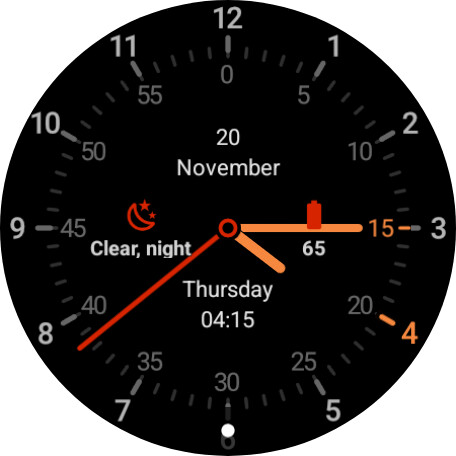
After way too much time messing around with Gemini to write my template tile , I’m rocking this.
