I think that the edit using strikethrough text (leaving the text in place) was proper to correct the misinformation provided by the support department.
Also, I don’t know if it is available to all user permissions levels, but the Discord forum software has a complete edit history available on all posts via the orange pencil with a badge count on top of each edited post…
Nobody checks edit history. I’d suggest that if he wants to edit it, he should clearly mark that ‘he’ edited the changes, not the original poster. That would be an ok middle ground for me.
<---- Frequently checks edit history on all Discord forums that I’m a member of.
Also worth adding a footnote that both the new wifi and this ethernet Hub have the power input and LED status indicators on the opposite side from the antenna. Since they supposedly come with wall-mount brackets from what I’ve read, the plug locations aren’t a deal-breaker for me.
(Note to @eric to feel free to strikethrough the brackets thing above if I’m mistaken…)
I just received the “new” updated purple hub. I need to stop using the “old” style hub and connect the new. I can’t seem to find any info on if I will lose any data history or such. Is it the same procedure as if I am starting from scratch with a TWS?
Also, mine did not come with a bracket I have seem mentioned.
Contact Support. They can “stitch” the data in from the old “Classic Wi-Fi” Hub to the new “purple” one. In that process. . .you might lose about 12 hours-worth of historical data. . .but the remainder going back in history would still be there.
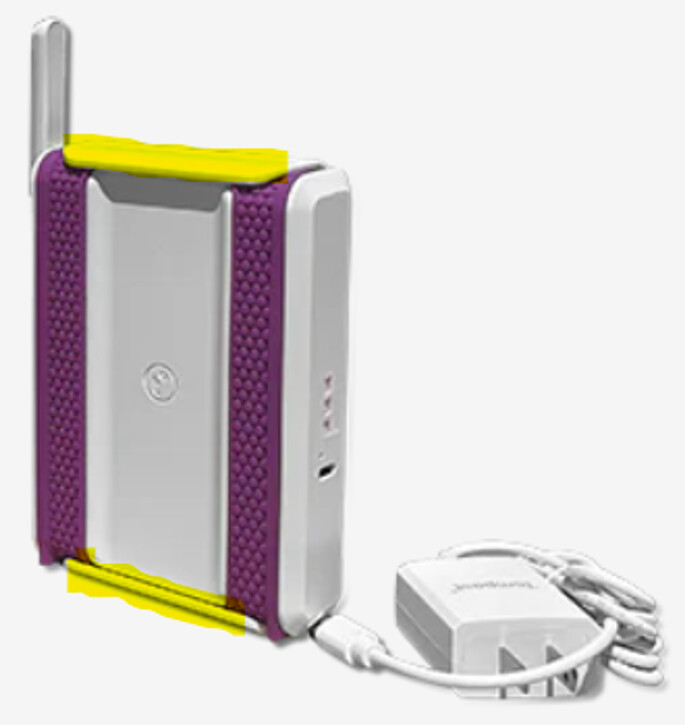
For the new “purple” Hub (TE-HUB). . .the mounting bracket snaps onto the back as shown in the highlighted portion of the image below. If your “purple” Hub did not have the bracket snapped onto the back. . .again. . .contact Support so that they can send a bracket to you.
Just reviewed your top post from above. You’d mentioned your Hub has an Ethernet port on it as well. To my knowledge. . .the “purple” Wi-Fi Hub does not have the Ethernet port on it. Only the more expensive “industrial strength” Hub does. . .but it is gray in color…not purple. The “gray” Hub should also have a bracket that snaps onto the back of the hub. . .but the bracket is not shown in the image below.
Really wish this was shipped with the Tempest weather station instead of the WiFi only model or at least provide another package option with this hub at an increase price to offset the cost difference. Would much rather have an Ethernet connection instead of WiFi. Can’t justify $150 for an Ethernet adapter.
In addition. . .the back side of the Tempest sensor device. . .Finally has the t° logo etched into it instead of the old WeatherFlow logo that has been around since ~ 2016. . .when the system was first developed.
I am glad to see that it has an antenna which can be rotated up into the vertical position. Lots different than the “Classic Wi-Fi Hub(s)” that I am still using. The antenna on Classic Hub is internal (encased in the plastic housing) and attached to the main PCB (PrintedCircuitBoard) and located on the Left side of the classic hub (as you look at the USB plug-in AND the Green LED facing you.) The antenna on the Classic Hub could not be seen since it was internal. See Historical Images below. For the second image. . .the antenna is the black item on the left (attached to back side of PCB.)