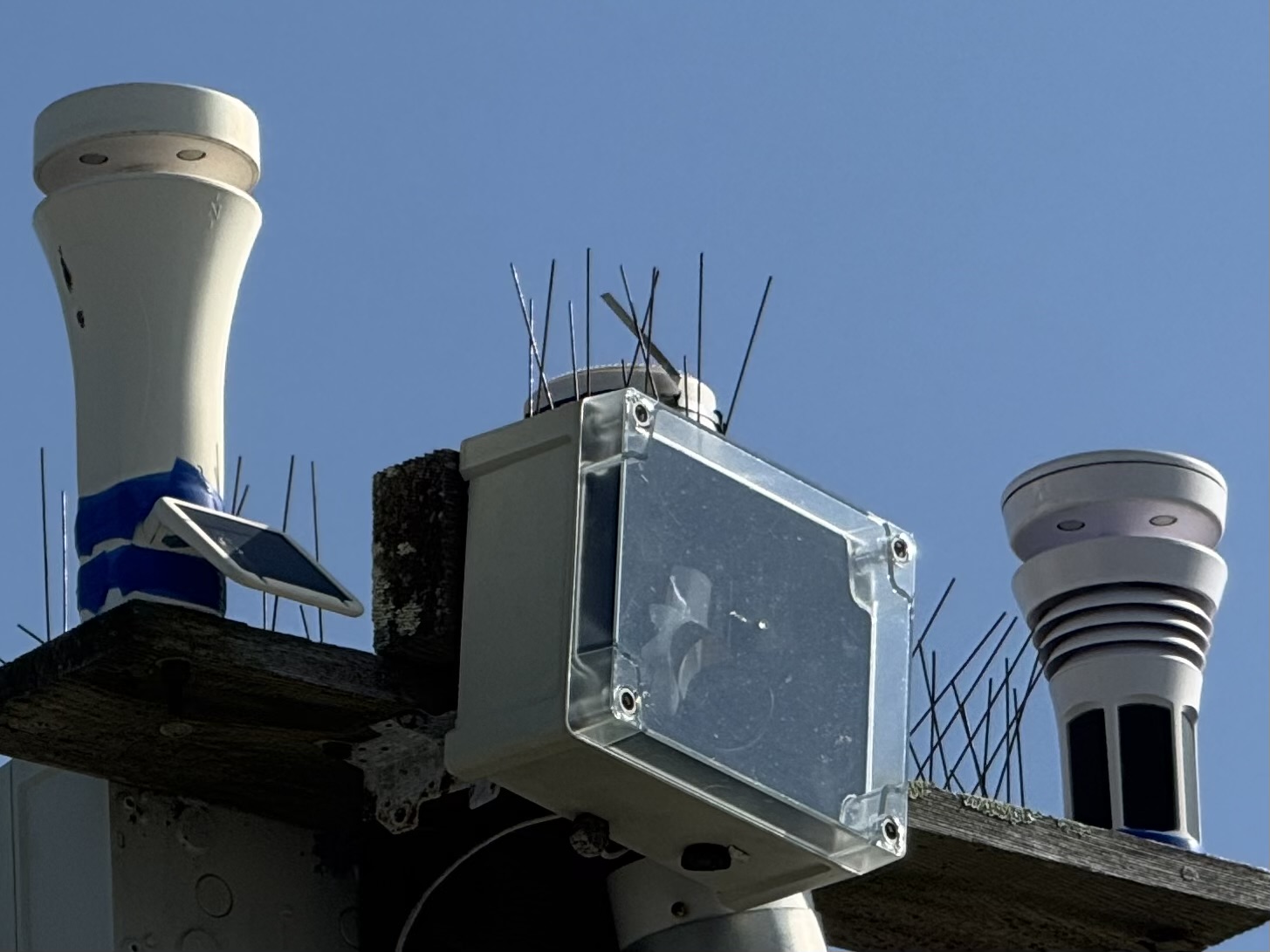
Remounting an older Sky sensor and all the documentation doesn’t seem easy to find in terms of orientation.
On the Tempest, I know you have the N facing south so the panels are in the correct direction, but about the older Sky? Do you still leave it facing north and the software autocorrects it?
on the back side of WF-SKY01 device. . .the is a “ N “ etched in a the top just below the airgap. That “N” would face true South in the Southern Hemisphere. (Face toward true North in the Northern Hemisphere.)
The Tempest devices have a. . .
etched in at the top back side. . .as the “N”orth marker. For Southern Hemisphere users. . .simply Reverse the sensor device so that the markers face true “S”outh.
So basically (especially for Tempest). . .the solar panels would Always face toward the Equator. . .no matter which Hemisphere you are in.
As long as the Solar Panels on Tempest device are facing toward true (Not magnetic) “S”outh in your hemisphere. . .the sensor devices are oriented correctly, and the App will automatically adjust for that based on your Lat / Long setting. For WF-SKY01…in your Hemisphere. . .make sure the “N” faces true South. Since there are no solar panels on WF-SKY01 (unless you have the Solar Power Accessory). . .the flat / blank side of WF-SKY01 would then face the Equator.
@storm_tracker Are you sure about this? My question is strictly for the SKY and since I didn’t have a reply to this, I turned on a fan and had it pointed so that the airflow was coming from True North, then I held the Sky in the path of the airflow with the side with the ‘N’ pointing True North and into the airflow and the app recorded the direction as North???
And the solar power accessory only goes on in one direction which causes the Sky to turn around when in the Southern hemisphere.
This photo is taken from the NE direction showing my Sky with its N facing north and its solar panel facing north and my Tempest panels facing the sun in the Southern hemisphere.
Weatherflow software either corrects the orientation or you can add an offset if required which can occur if using batteries and mounting it on a mount in the opposite direction.
And when swapping between a Sky with spa with a Tempest onto the same mount or a Sky without an SPA the mount needs to be rotated 180 degrees. Because the SPA causes a 180 degree rotation.
To simplify the mounting when swapping devices or removing the SPA at the end of the day the solar panels must face the sun and you can add a 180 degree offset to the wind direction if required.
Cheers Ian 
My bad. . .I failed to mention that in the App. . .you have go into Settings | then under Device, choose your device, then click on Advanced | then click on it to see the Advanced pop-up, then choose Wind Direction Offset to see the Offset pop-up window.
From there. . .you will see this:
Use Left mouse button the grab the dot at the top (or wherever it is on the circle) and spin it to the Right for Positive offset. . .spin it the Left for Negative offset. For your case. . .you would want a 180° offset with Pos or Neg. But you may want an offset Other Than 180°. . .so you have to choose whether that Would Be either Pos or Neg., After making the offset choice. . .click Save then click the Back arrow ( < ) several times to get back to the beginning. OR After making the correction. . .the App will ask Are you sure? (you want to make this change) Anwer Yes to accept and then wait for about 5-8 minutes to ensure that is want you want If not. . .repeat the procedure to Fine Tune the offset direction of your choice.
@iladyman would know this better than I would…because he lives Australia. .. and he was one of the Original SWS Field Testers. . .but before I bought my WF-SWS in 2019. . . I thought I remembered seeing that WF had created two version of the WF-SKY01. . . .One Version for Nrn Hemisphere users. . .and Another Version for Srn Hemisphere users. Each version was correctly made so that they were ready for instant setup and usage.
Got some time to test out in the field today and it does seem like the SKY units are auto-correcting for North orientation in the Southern Hemisphere and can always point North—opposite to the Tempest.
I have an older Sky and a Tempest both deployed about 10m away from each other. The tempest is flipped around so the panels are oriented to the North and the Sky is oriented with the “N” facing North. So the SKY is pointing ‘True’ and the Tempest is inverted. Both are reporting similar wind directions and both have their Wind offset set to 0°.
So there must be some server side calibration occurring based on the station location Lat/Long and accounting for station type. In that, the SKY units can be pointed North regardless of Hemisphere and will always be correct, whereas the Tempest needs to be inverted and will also be corrected automatically (no Wind direction offset required).
Why would the Sky need to be rotated south of the equator? North is north, and there’s no solar panels on the Sky as delivered so facing the sun is not a factor.
If you have added the optional Solar Power Accessory (SPA), then the Sky does need to face the equator and a 180 degree offset applied to the Sky in settings.
IIRC, the Sky has no way to detect that a SPA is connected, so the app can’t auto-adjust orientation…